
The Linux Vendor Firmware Service is a Malicious Remote Backdoor, and You Should Turn it Off Now.
For context, see: You May Get “Failed to load signature: Need more input” Error on Debian 12 and Other Distributions With LVFS. What is LVFS?
As that article is now incorporated by reference, let us continue the series.
I even ran into this with KDE the other day. The Linux Vendor Firmware Service screwed up, but the error message was vague and Plasma Discover (the software center) merely passed it along to me, the user, verbatim.
It turns out it’s not even KDE’s fault. If something happens lower down in the stack it just opens a dialog box and pastes “What LVFS said.” So the solution was kill LVFS by removing it from the list of “software repositories”.
The only thing it includes for my Lenovo computers are Microsoft blacklists of things they don’t want your computer to boot, when you have “Security Theater Boot” turned on, which I do not. So disabling it closes a serious hole in my actual security.
In my case, once I finally tracked down the root cause for the error message, it turned out that IBM is misconfiguring their “Content Delivery Network” for LVFS and causing a four byte signature mismatch.
So LVFS runs into that problem, it too was “designed” by IBM, and the error message is bogus and jargon (of course), and never hints that LVFS is the problem, so KDE passed the message to me and it was unclear what even happened.
If it takes me half an hour to figure out what’s happening, you’ve messed up and most people wouldn’t even stand a chance.
Since LVFS is a remote backdoor, not even controlled by Debian, and a repo for blobs thrown in directly by hardware vendors, one has to wonder how this made it past not only the Debian Social Contract, but how it is Debian Free Software Guidelines compatible, or acked by Debian Security.
Hmm.
If they’re worried about Free Software Guidelines enough to not include CPU microcode updates, why are they including a repo they don’t even control for Microsoft Security Theater Boot revocation lists? Thrown in directly by Microsoft!
If CPU and sound firmware is defined as “Non-Free software“, then why aren’t firmware blobs thrown in by Microsoft and hardware vendors into IBM’s remote backdoor, LVFS?
This violates the Debian Free Software Guidelines:
Free redistribution.
Inclusion of source code.
Allowing for modifications and derived works.
Integrity of the author’s source code (as a compromise).
No discrimination against persons or groups.
No discrimination against fields of endeavor, like commercial use.
The license needs to apply to all to whom the program is redistributed.
License must not be specific to a product. License must not restrict other software.
–Debian Free Software Guidelines
When I highlight “License must not restrict other software.”, LVFS bringing in Microsoft “dbx” updates restricts other software. It stops bootloaders that were previously allowed using Microsoft’s third-party certificate from booting at all, at Microsoft’s sole discretion.
So LVFS puts Microsoft in control of your computer long after you’ve even removed Windows, and gives them a backdoor, a remote hole, to decide what you can boot in the future.
Nobody can even argue that these are Free Software, or that the user could load modified copies into the UEFI and run them. The only thing you CAN do is turn off LVFS so it doesn’t flash anymore “updates” into your UEFI firmware which can’t be backed out.
This probably violates the Debian Social Contract too:
Debian will remain 100% free.
We will give back to the free software community.
We will not hide problems.
Our priorities are our users and free software.
Works that do not meet our free software standards [go into ‘contrib’ or ‘non-Free’].
-Debian Social Contract
Again, firmwares are (usually) not Free, the dbx firmware’s sole purpose is to prevent the user from booting things. And firmware updates mostly happen to silently hide problems with hardware so that vendors don’t have to recall it and provide a corrected version or a refund.
The way LVFS itself is designed, hides problems. (Like the cryptic error messages IBM put inside it to make it not obvious where its own errors come from!)
That last one is extraneous, as no Free operating system has ever tried to stop the user from adding non-Free bits.
Technically, you could take the FSF-approved Triquel GNU/Linux distribution, and add the regular Linux kernel, with blobs, and run Google Chrome. You’d be missing the whole reason that Trisquel even exists, and basically turn it back into Ubuntu….but it wouldn’t stop you.
Technically, disabling proprietary software and Snap making sure it doesn’t end up in the distribution is better than running Ubuntu even if the user does end up running a normal, blobbed, Linux kernel. But the reason the FSF endorses Trisquel is that it does not promote ANY ethical harms against the user. The FSF does not endorse Debian, because there has been far too much compromise, including LVFS.
Finally, Debian Security.
This thing is not hosted by Debian, and it’s a source of blobs that nobody is allowed to decompile and study. Nobody can audit them. Some make permanent, non-reversible changes to your computer, at the whim of a manufacturer, for malign purposes in the case of Microsoft “dbx” updates.
How did this all get past Debian Security?
To turn off LVFS:
Open Plasma Discover, go to Settings, and uncheck everything that says “LVFS” under “Firmware Updates”.
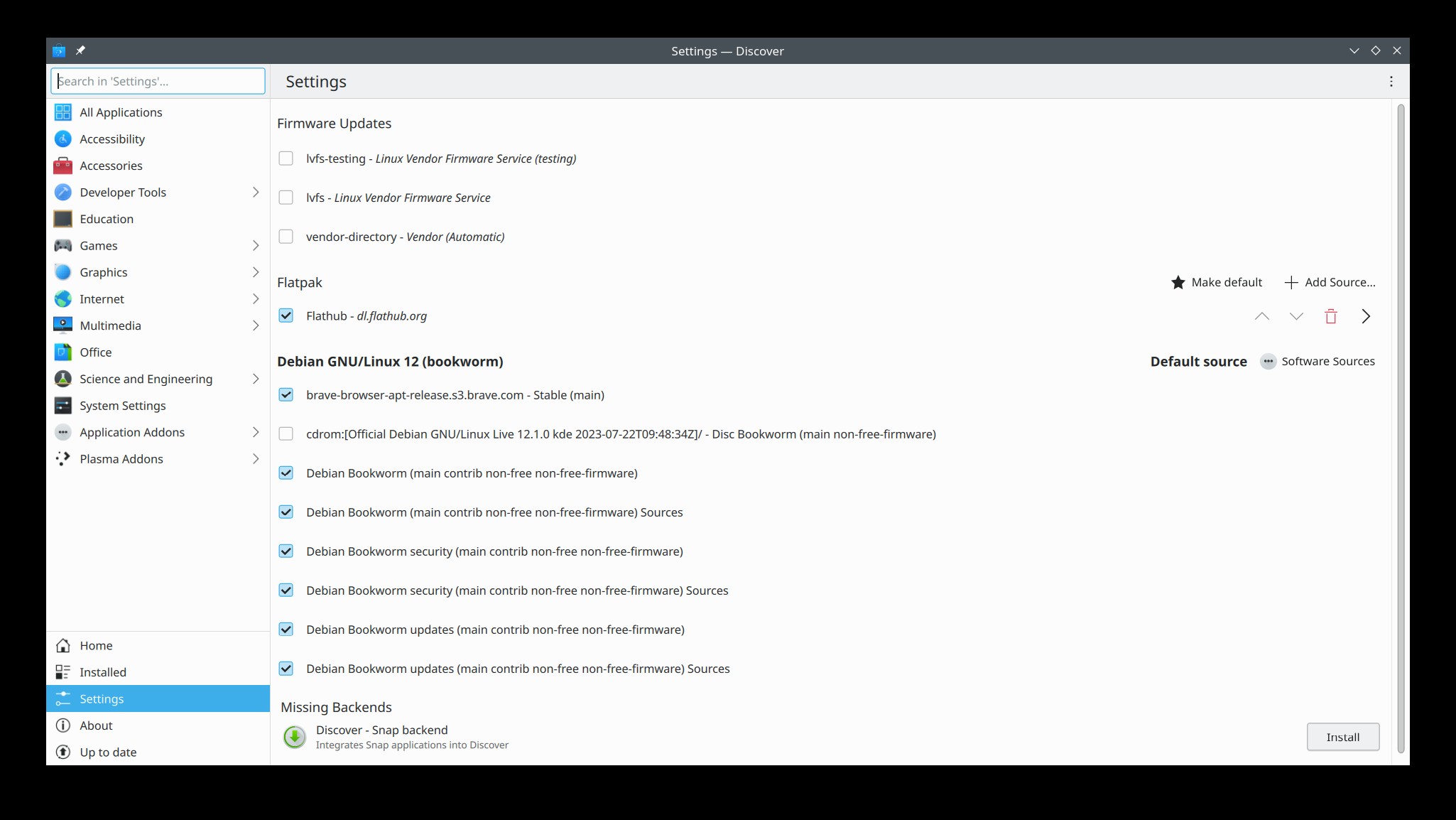
It should look like this after it asks for your administrative password.
GNOME Software also has an option to disable LVFS repositories, but I don’t have GNOME on any of my computers now. It shouldn’t be that difficult to find.
Unfortunately, if Microsoft or other “vendors” have damaged your computer already through IBM’s remote backdoor, then there’s not much you can do to revert it, but you can make them stop throwing in more things. In the future, perhaps you should even install Debian or your chosen Linux distribution offline and make sure LVFS is turned off before you even allow the computer onto the Internet.
Alternatively, you could get rid of the fwupd junk to make sure LVFS doesn’t come back:
WARNING! This is definitely a more radical step than turning off the LVFS repos, but since there’s nothing in those repos for my laptop except Microsoft “dbx” updates, I decided I didn’t want fwupd at all.
If you have a computer from a vendor that actually updates your UEFI or if System76 is updating Coreboot for you this way (I don’t know if this is how they service it or not. ASK THEM.), you may want to skip this.
NOTE: I did this on Debian 12 KDE and it worked for me without proposing anything stupid or unrelated to fwupd.
I don’t know what happens to GNOME or other Linux distributions if you try to remove fwupd, and frankly I don’t care since I no longer use GNOME.
If you attempt to remove it from GNOME, be careful that it does not propose removing other important packages!
Also note, there may be other fwupd packages to tie it into GNOME that I didn’t include here.
If you totally destroy your OS somehow, you get to keep both pieces. ðŸâ¢â
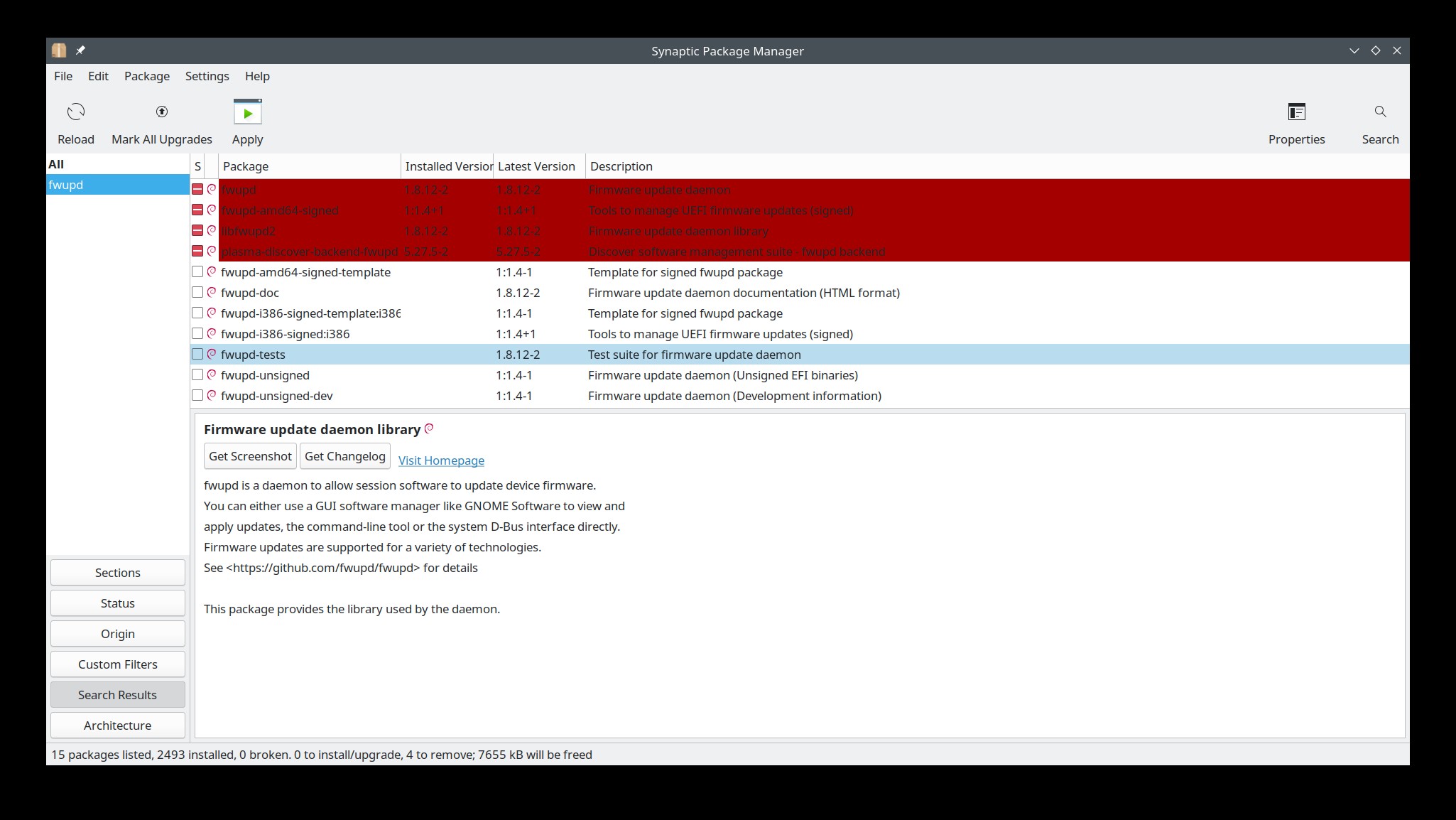
I opened Synaptic Package manager, and typed fwupd, and arranged the packages so it shows the installed ones.
Then right-clicked and selected “mark for complete removal” fwupd, fwupd-amd64-signed, libfwupd2, and plasma-discover-backend-fwupd.
Alternatively,
sudo apt purge fwupd fwupd-amd64-signed libfwupd2 plasma-discover-backend-fwupd
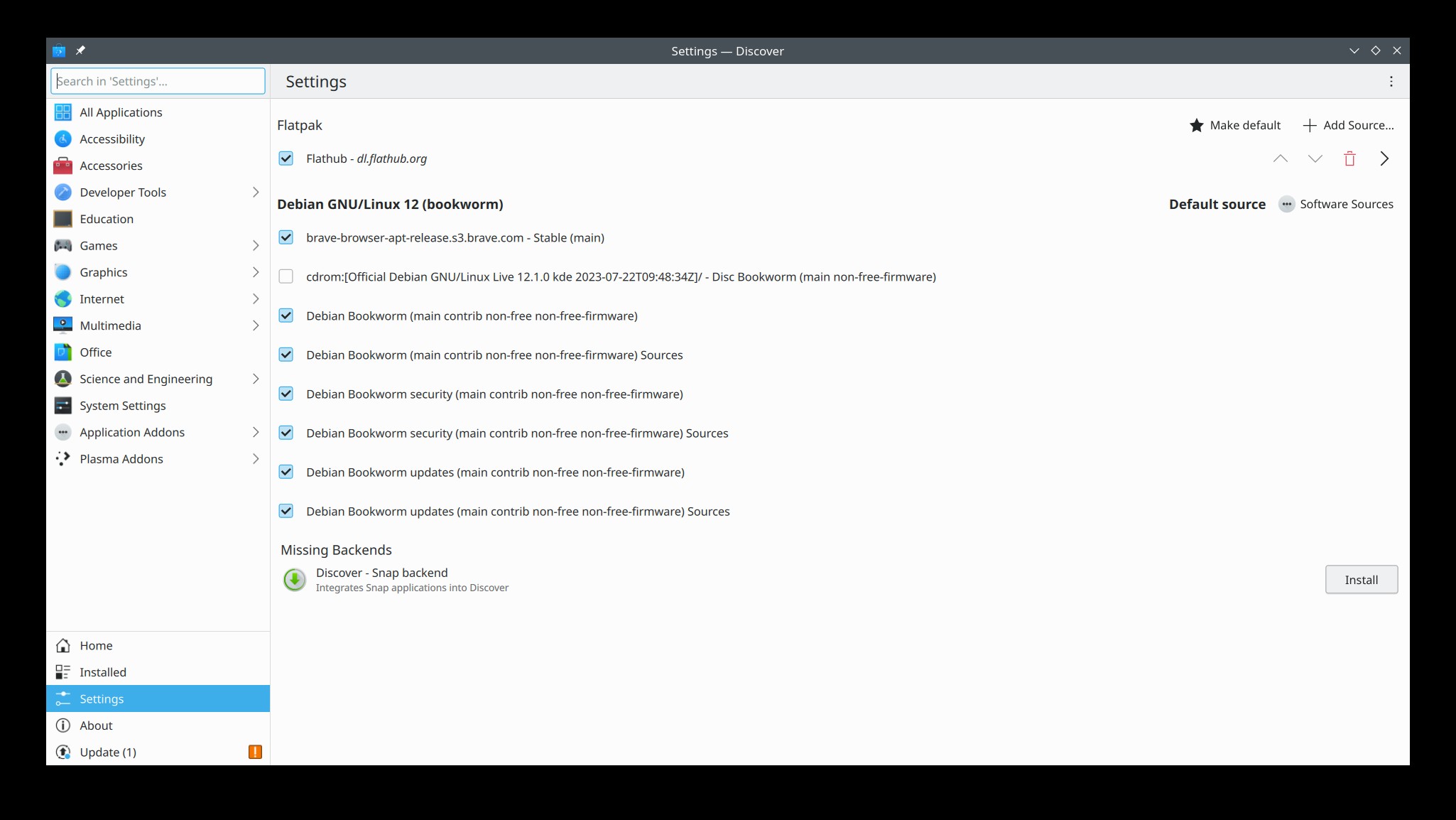
I then verified that LVFS is gone from Plasma Discover:
Will this screw up direct loading sound, graphics, WiFi, and CPU firmware?
No, the kernel direct-loads these on boot, so my system did not have any trouble when I restarted it. I verified that the processors still have the latest firmware from Intel and the firmware for my devices is still loading normally.
fwupd appears to only manage updates to system firmwares.
On some computers, this can include entire UEFI upgrades, but on mine it doesn’t. I don’t want UEFI upgrades in the background even if it did. They can screw up and brick your entire PC. The firmware that’s in there now works. The one they offer you has Never Worked. ⬆